
This article highlights advanced configuration options available with the sanctions.io Salesforce integration. These optional customizations allow teams to enhance visibility and enforce additional compliance controls when active screening alerts are present.
Please contact us at help@sanctions.io to discuss your requirements and implementation options.
Topics Covered
→ Customizing the UI When Active Screening Alerts Are Present on a Record
→ Preventing Field Updates to Records When Active Screening Alerts Exist
Customizing the UI When Active Screening Alerts Are Present on a Record
By default, when active screening alerts (not marked as False Positive) exist on a record, users can view them directly in the related list. For most workflows, this provides sufficient visibility to determine that the person or entity should not proceed in a business process.
For teams that want to make this status more prominent, the Salesforce UI can be further customized to visually flag records with active screening alerts.
Customization Overview
Using Salesforce automation, a record can be dynamically flagged when active screening alerts exist. This flag can then be used to control the visibility of UI elements that clearly indicate the record is under review or should not be actioned.
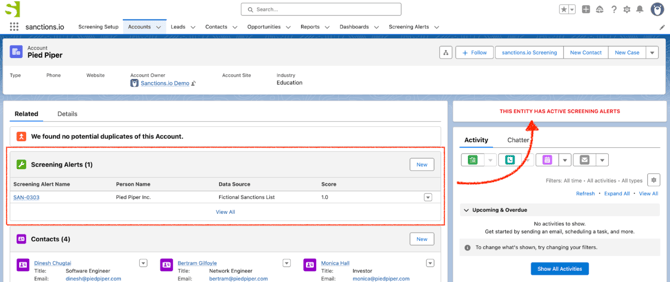
Common enhancements include:
-
Displaying a bold warning message or banner on the record page
-
Highlighting that the record is currently flagged due to screening results
-
Making alert status immediately visible without navigating to related lists
This customization helps ensure users clearly understand when a record is impacted by active screening alerts, reducing the risk of proceeding with restricted entities.
Please reach out to our team if you would like to explore this customization or determine whether it fits your workflow.
Preventing Field Updates to Records When Active Screening Alerts Exist
As part of a broader compliance process, some organizations enforce stricter controls when screening alerts are present, blocking updates to certain records until a compliance review is complete.
Customization Overview
When active screening alerts exist on a record (alerts not marked as False Positive), Salesforce behavior can be extended to block record updates until those alerts are resolved. This ensures that key records cannot be modified while screening issues remain open.
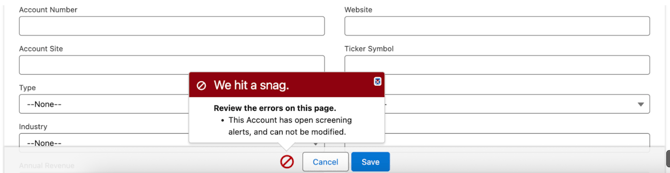
This approach leverages the native Salesforce screening alert records and applies enforcement consistently.
Common Use Cases
-
Preventing changes while a compliance review is pending
-
Enforcing governance over regulated data updates
-
Ensuring alerts are resolved before business processes continue
Please reach out to our team to discuss whether this customization is appropriate for your use case and to explore implementation options.
We're here to help!
We offer hands-on onboarding support and can guide you through configuring the integration to match your specific use case.
For any additional questions or further assistance, please don't hesitate to reach out to our support team.
-
Chat: Available directly in the 'Help Center' page
-
Email: help@sanctions.io