
In many organizations, sales representatives conduct screenings throughout the sales process. They are typically part of the Standard User permission group in the sanctions.io application, allowing them to initiate screenings without making compliance decisions.
In most cases, this setup is sufficient: Sales users are instructed not to modify screening alerts, leaving all auditing and compliance actions to the compliance team.
As an additional layer of control, some companies choose to fully restrict updates to compliance audit fields, ensuring that only designated compliance roles can modify them. This can be achieved using native Salesforce Validation Rules.
Use Case
-
Allow Sales users to run screenings.
-
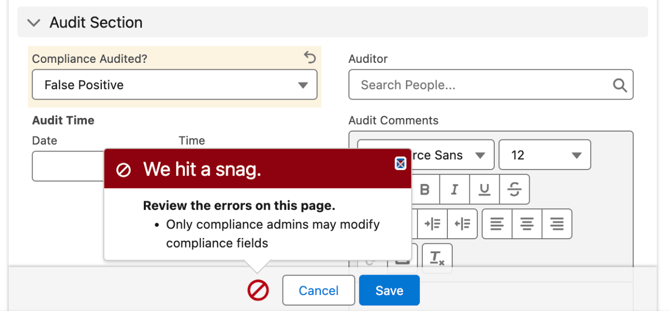
Prevent Sales users from editing audit or compliance fields.
-
Restrict audit actions to Compliance, Sales Managers, or System Administrators.
How to set it up
1. In Setup, navigate to Object Manager.
2. Locate and select the Screening Alert object.
3. Select Validation Rules, then click New.
4. Enter the validation rule formula as shown below:
AND(
NOT(
OR(
$Profile.Name = "System Administrator",
$Profile.Name = "Sales Manager",
$Profile.Name = "Compliance User"
)
),
OR(
ISCHANGED( Sanctions__Compliance_Audited__c ),
ISCHANGED( Sanctions__Auditor__c ),
ISCHANGED( Sanctions__Audit_Comments__c ),
ISCHANGED( Sanctions__Audit_Time__c )
)
)
5. Add an Error Message, such as:
You do not have permission to update compliance audit fields. Please contact the Compliance team or your Salesforce administrator.
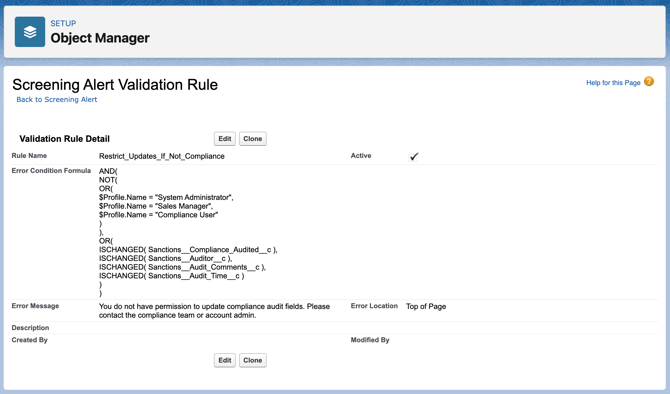
With this validation rule in place:
-
Sales users can continue to initiate and view screenings.
-
Only approved compliance profiles can update audit-related fields.
-
Compliance processes are protected using standard Salesforce functionality.
We're here to help!
We offer hands-on onboarding support and can guide you through configuring the integration to match your specific use case.
For any additional questions or further assistance, please don't hesitate to reach out to our support team.
-
Chat: Available directly in the 'Help Center' page
-
Email: help@sanctions.io