
Easily view, create, and manage your API tokens for both Production and Sandbox environments directly within the sanctions.io portal. API tokens provide secure, programmatic access to your account and resources, enabling seamless integration and control of your screening workflows.
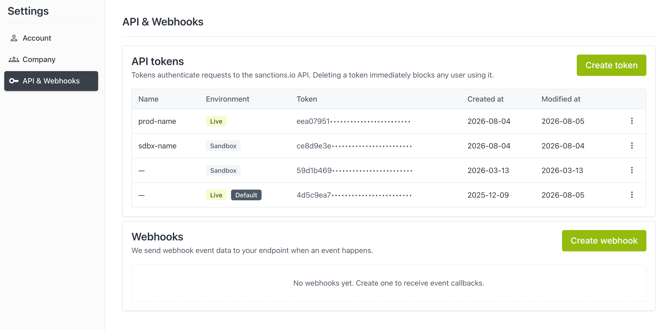
You can also manage tokens programmatically via API calls. See our API documentation for details.
Topics Covered
Best Practices and Considerations
- Each user has a default API token that is automatically generated during account creation. API tokens are personal and not shared between users.
- API tokens are a critical security component. Changing or deleting a token may immediately impact the stability and performance of your systems.
- API tokens remain active until they are manually revoked or deleted.
- Rotate tokens periodically to reduce security risks.
- Give each token a descriptive name (e.g., "prod-crm-integration", "qa-sandbox") so you can quickly identify its purpose and safely revoke the right one later.
- Remove tokens that are no longer in use.
Create a Token
- Go to Settings → API & Webhooks.
- In the API tokens section, click Create token.
- In the Create API token dialog, enter a Name for the token (e.g., "Production backend").
- By default, the token is created for the Live environment. To create a Sandbox token instead, toggle Sandbox on.
- Click Create token. Your new token will be immediately available in the token list.
View or Copy a Token
- In the API tokens table, locate the token you want.
- Click the ⋮ (actions) menu at the end of the row.
- Select Show token to reveal the full value, or Copy token to copy it directly to your clipboard.
Set a Token as Default
- In the API tokens table, locate the token you want to set as the default.
- Click the ⋮ (actions) menu at the end of the row.
- Select Set as default.
Note: Only Live tokens can be set as the default.
Delete a Token
- In the API tokens table, locate the token you want to remove.
- Click the ⋮ (actions) menu at the end of the row.
- Select Delete token.
- Confirm the deletion.
Warning: This action can't be undone. Deleting a token immediately invalidates it and may directly impact system stability and performance — any user or integration still relying on it will lose access and encounter request failures until the token is updated or replaced.
We're here to help!
If you have any questions or require further assistance, please don't hesitate to reach out to our support team:
- Chat: Available directly in the Help Center page
- Email: help@sanctions.io